

Range BreakOut Indicator with Buffers for MetaTrader 5 | Download FREE
$0.00
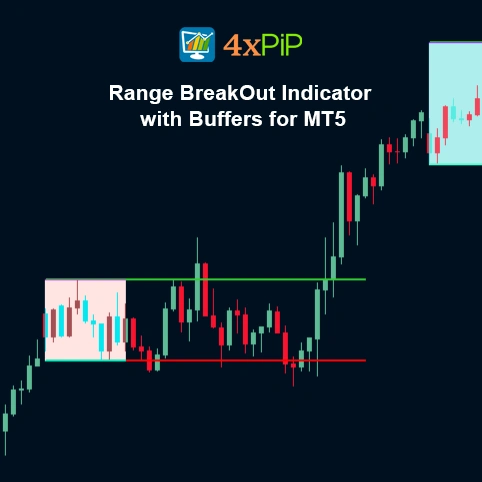
The Range BreakOut Indicator with Buffers for MetaTrader 5 automatically identifies a specific time-based price range and marks breakout levels above and below it. It calculates range highs and lows within a set time period, applies volatility-based buffers, and plots breakout zones on the chart. Traders use it to spot breakout opportunities, confirm volatility expansion, and plan buy/sell entries with precision.
Description
What is the Range BreakOut Indicator with Buffers?
This indicator is designed to detect a trading range within a defined session. For example, from 00:00 to 05:00 on GBPUSD M15 and then project potential breakout zones. It uses the high and low of that range as reference points and adds volatility buffers based on the Average True Range (ATR). These levels help traders identify when the price breaks out of the range, signaling potential trade entries.
How does it work on MetaTrader 5?
The indicator calculates the range between the Range Start Time and Range End Time. It records the highest (RangeHigh) and lowest (RangeLow) prices during that period. After the range ends, it extends these levels forward to the Trade End Time. Using ATR, the indicator builds upper and lower buffers to show where the market might break out. A close above or below these buffer levels indicates a possible bullish or bearish breakout.
Why Should Traders Use This Indicator?
The Range BreakOut Indicator simplifies breakout trading. Instead of manually tracking session highs and lows, traders can instantly view range zones and potential breakout targets. It’s particularly effective for London and New York session openings, where price volatility tends to increase after consolidation periods.
How to Trade Session Breakouts Using the Range BreakOut Indicator with Buffers on MT5
To trade session breakouts, start by applying the Range Breakout Indicator on MT5. The indicator will mark the high and low of a trading session, such as London, New York, or Asia. Once the session range is formed, wait for the price to break above the high or below the low. This shows that the market is gaining momentum and may continue in that direction.
The buffer feature helps avoid false signals. Instead of entering the moment the price touches the breakout level, the buffer adds a small extra distance. If price moves beyond this buffer, the breakout is confirmed, and the trade becomes safer. You can enter the trade after the buffer is crossed, place a stop-loss inside the range, and aim for a reward based on recent market structure or volatility.
Advantages
- Detects breakout zones automatically.
- Saves time by marking range levels visually.
- Helps identify high-probability trade entries.
- Supports all timeframes and currency pairs.
- Adapts to market volatility using ATR buffers.
- Reduces manual analysis errors.
- Works for both trend-following and reversal setups.
- Improves breakout confirmation accuracy.
- Ideal for London and New York session trading.
- Compatible with all MetaTrader 5 brokers.
Features
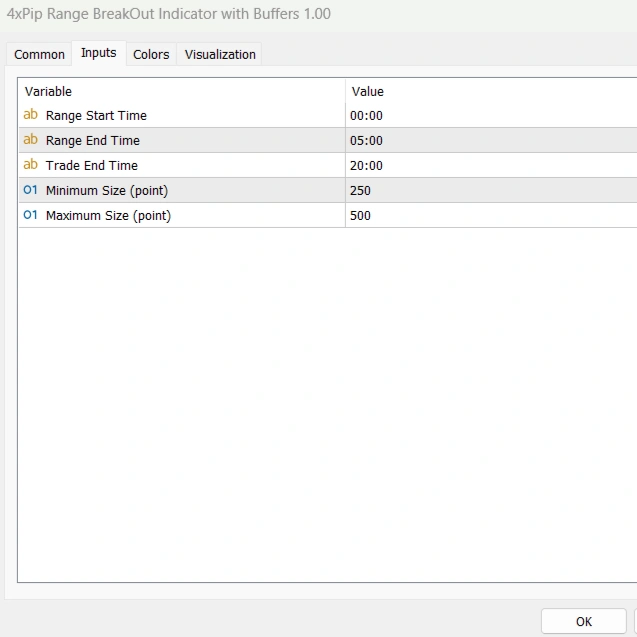
- Range Start Time: defines when the range calculation begins.
- Range End Time: defines when the range calculation stops.
- Trade End Time: extends range lines until a defined time.
- Minimum Size: sets the smallest allowed range in points.
- Maximum Size: sets the largest allowed range in points.
- ATR-based Buffers: dynamically adjust breakout levels based on volatility.
- Color-coded Zones: visual display for valid range zones.
- Breakout Alerts: notify when price breaks the range.
- Multi-timeframe Compatibility: works on M1 to H4 charts.
- Optimized for GBPUSD M15 Range Strategy: suitable for session-based breakouts.
How to Trade
The strategy starts by selecting a session with predictable volatility expansion, such as 00:00–05:00 on GBPUSD M15. During this period, do not enter trades just simply allow the indicator to mark the RangeHigh and RangeLow. Once the session ends, wait for price to break and close beyond either ATR-buffered breakout level. A close above the upper buffer signals a bullish breakout and potential long entry, while a close below the lower buffer confirms a bearish breakout. Stop-loss is placed inside the range to reduce risk and avoid fake spikes.
Trade management focuses on momentum continuation. After entering, aim for a 1:1.5 or 1:2 reward-to-risk ratio, or trail the stop below/above structure. If price returns back into the range after breakout, exit early. The indicator works well during London and New York openings, where volatility increases. For safer setups, only trade if the range size is neither too small nor too large compared to the recent ATR. When used consistently, this strategy filters noise and provides precise, high-probability breakout entries.
Formulas
Define Range
- RangeHigh = Highest price during selected time
- RangeLow = Lowest price during selected time
Calculate ATR Buffer
- Buffer = ATR(Period) × Multiplier
Calculate Breakout Levels
- Upper Breakout = RangeHigh + Buffer
- Lower Breakout = RangeLow – Buffer
Conclusion
The Range BreakOut Indicator with Buffers for MT5 is a simple yet powerful breakout detection tool. It helps traders spot session-based price ranges and breakout levels with accuracy. By combining time-based ranges and ATR-based buffers, it adapts to real market volatility. This indicator is ideal for traders who want fast, visual confirmation of breakout zones without manual chart marking.
DOWNLOAD NOW Reach Us on WhatsApp
 Fly Over to Telegram
 Drop Us an Email

Reviews
There are no reviews yet